Build AI-first spatial apps with CARTO Agentic Tools for developers


If you're building an AI-powered application and you want your AI Agent to work with maps (create layers, style spatial data, run geospatial analytics), your options today are slim. You either build it all from scratch or lock into a massive legacy platform. We think there's a better way.
Today we're releasing CARTO's Agentic Tools for developers: an open-source TypeScript library built on CARTO + deck.gl that gives any AI Agent full control over a map. One npm install, and your agent can create and style data layers, navigate the globe, request spatial input from users, and visualize the results of heavy analytical workflows, all from natural language.
The AI stack for developers is moving fast. Geospatial needs to keep up.
The pace of change in the AI ecosystem has been staggering. Standards like the Model Context Protocol (MCP) and Agent-to-Agent (A2A) are maturing. Agent frameworks like OpenAI Agents SDK, Vercel AI SDK, and Google ADK have established solid patterns for tool calling, streaming, and orchestration. And models keep getting better with every release.
The software industry has adapted quickly. But most of this progress has happened on the general-purpose side of the stack. Geospatial tooling, the kind that connects agents to maps, spatial data, and location analytics, is still largely locked behind closed, monolithic environments. If the AI side of the stack is open and composable, the geospatial side needs to be too. Otherwise, we risk keeping spatial capabilities siloed away from the millions of developers now building with agents.
Introducing CARTO Agentic Tools
The @carto/agentic-deckgl library is a framework-agnostic package that builds on spatial apps using CARTO + deck.gl and gives AI Agents the ability to control a map through standard tool calls. It provides tool definitions with Zod validation, a system prompt builder packed with geospatial knowledge, and SDK converters for the major AI frameworks.
Here's what the agent can do:
- Create and configure map layers: vector tiles, H3 hexagons, GeoJSON, raster, using any CARTO data source.
- Style data dynamically: color bins, color categories, size scales, and opacity, all driven by data attributes.
- Navigate the map: fly to coordinates, adjust zoom, pitch, and bearing with smooth transitions.
- Switch basemaps: dark, light, and street-level styles.
- Place and manage markers: location pins with add, remove, and clear operations.
- Spatial filtering: let users draw areas of interest on the map, or use geometries from analytical workflows to clip all visible layers.
- Widgets, effects, and layer ordering: histograms, lighting effects, full control over what's visible and in what order.
All of this through just three consolidated tools: set-deck-state, set-marker, and set-mask-layer. This design is deliberate. Rather than bloating the context with dozens of granular endpoints, the library teaches the agent the deck.gl JSON specification itself. This gives the agent the flexibility to express virtually any visualization, while the library validates every spec before it hits the map.
Scales to real-world data — and your data never leaves your warehouse
Your data never moves. CARTO connects directly to your cloud data warehouse (BigQuery, Snowflake, Databricks, Redshift, Oracle, PostgreSQL) and queries it in place. No data copies, no ETL pipelines, no sync jobs. The agent visualizes live data, governed by the same access controls you already have in place.
When an agent creates a layer, the data behind it doesn't get dumped into the browser. CARTO's dynamic tiling engine serves only the tiles the viewport needs, at the right resolution for the current zoom level. That means your agent can work with tables containing hundreds of millions of rows (spatial indexes like H3, Quadbin, or vector tiles) and the map stays fast and responsive. The same mechanism powers filters, aggregations, and styling: everything is computed server-side and streamed as tiles on demand.
Enterprise-ready AI, by design
Security and governance aren't afterthoughts in the CARTO architecture: they're built into it from the start. Many organizations evaluating AI-powered applications have hard requirements around data residency, access control, and model governance. Here's how CARTO addresses them.
Bring your own AI provider. CARTO Agentic Tools are model-agnostic. You connect the library to whichever LLM your organization has already approved and contracted (OpenAI, Google, Anthropic, Azure OpenAI, or any model exposed through a compatible API). If your enterprise has a vetted model agreement in place, CARTO works with it. You are never locked into a specific AI vendor.
Data stays in your warehouse, under your governance. When the agent visualizes or analyzes spatial data, CARTO queries your cloud data warehouse in place. No data is copied to CARTO's servers, no ETL pipelines move sensitive records, and your existing access controls (IAM roles, row-level security, and warehouse-level permissions) remain the authoritative layer. For teams dealing with sensitive location data, this is a hard requirement — and it's built into the architecture from the ground up.
Architecture that passes security review. The @carto/agentic-deckgl library runs on your frontend and calls your backend. CARTO's Maps API sits between your frontend and your warehouse, serving tiles without ever exposing raw data to the client. MCP-exposed workflows are pre-built and version-controlled, not generated on the fly, which means your security team can audit the logic that runs in production before it goes live.
A compliance posture built for the enterprise. CARTO maintains certifications and undergoes independent audits to give your security and procurement teams the documentation they need. You can review our full trust profile, including security practices, certifications, sub-processors, and data handling policies, at security.carto.com.
Compatible across the board
On the AI side, built-in converters support the OpenAI Agents SDK, Vercel AI SDK, and Google ADK:
typescript
import { getToolsForOpenAIAgents } from '@carto/agentic-deckgl';
import { getToolsForVercelAI } from '@carto/agentic-deckgl';
import { getToolsForGoogleADK } from '@carto/agentic-deckgl';
On the frontend side, zero framework coupling: it works with React, Angular, Vue, or plain JavaScript. The only hard dependencies are deck.gl and Zod.
Developer-first, geospatial expertise built in
CARTO has spent years building geospatial infrastructure: data sources, tiling engines, spatial SQL, styling systems, visualization libraries. The Agentic Tools package all of that expertise into AI-ready tools that any developer can pick up, without needing to become a GIS specialist first.
The system prompt builder is a good example. It doesn't just list available tools: it injects deep knowledge of deck.gl layer types, CARTO source functions, color palettes, filter syntax, and common workflow patterns. The agent arrives in the conversation already knowing how to build sophisticated map visualizations. You provide the business context; the library handles the geospatial context.
CARTO Agentic Tools in action
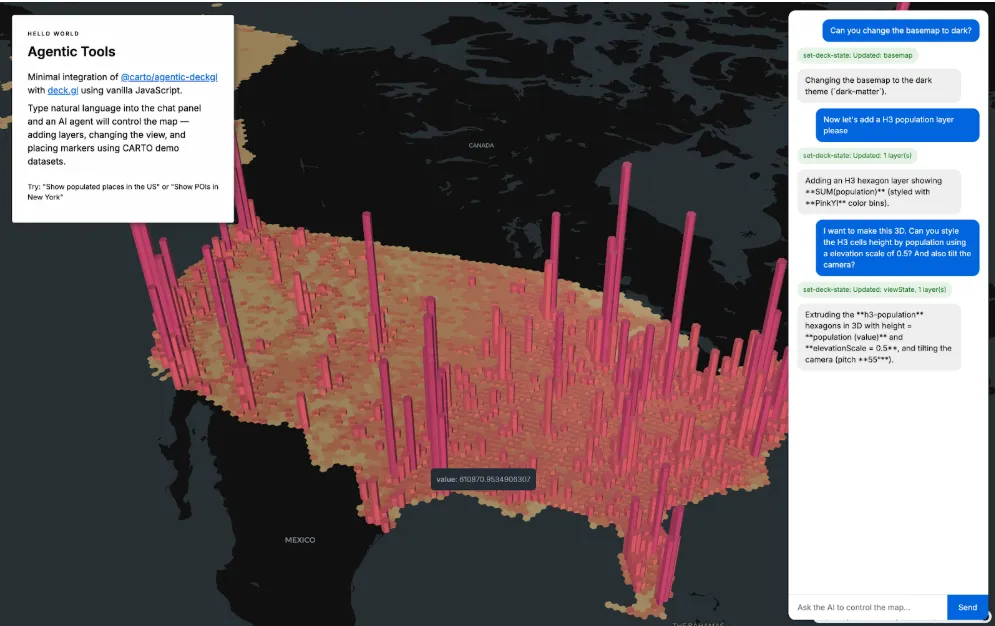
Here's a demo of an agent controlling the map in a custom application built with the library, creating layers from natural language, restyling data on the fly, navigating to locations, and filtering with spatial masks:
Example: The user asks to "show population density by county" and the agent generates a full VectorTileLayer spec with color bins, the right data source, and appropriate zoom levels, in a single tool call. They say "switch to a red palette" and the agent updates the layer in place through deep merge, preserving every other property. They draw an area on the map and all layers clip to it automatically.
Scaling up with the CARTO MCP Server
The tools in @carto/agentic-deckgl handle visualization and interaction. But what about heavy analytical workflows (isochrone calculations, trade area analysis, demographic enrichment, spatial joins across millions of rows)?
That's where the CARTO MCP Server comes in. With CARTO Workflows, you can build complex geospatial analysis pipelines (chaining buffers, joins, geocoding, routing, and even ML models) and expose them as MCP tools that any compatible agent can discover and call at runtime.
The key advantage: these workflows are predictable and auditable. Unlike fully generative approaches where the agent writes analysis code on the fly, MCP-exposed workflows run the same validated pipeline every time. Parameters change, but the logic is fixed and version-controlled. You get the flexibility of natural language input with the reliability of tested, pre-built analytics.
The library has first-class MCP support: the system prompt builder automatically teaches the agent when and how to use available MCP tools, including async workflow patterns. When you combine both pieces, the result is powerful: users ask complex geospatial questions in natural language, the agent executes analysis on the server, and the results render live on the map.
Example: "Show me a 15-minute drive time isochrone from our warehouse and highlight all retail locations within that area." The agent calls an MCP tool to compute the isochrone, sets the result as a mask layer, and the visible retail POIs filter to that region, all in one conversation turn. The user never needs to know a cloud workflow ran behind the scenes. They asked a question and got a map with the answer.
Get started
The library is open-source and available on npm:
npm install @carto/agentic-deckglSummary
The software industry and AI ecosystem is building its side of the stack at full speed — better models, frameworks, and standards every month. With the new CARTO Agentic Tools, we're making sure the geospatial side is ready too. All the spatial context, visualization power, and analytical depth that used to require specialist knowledge is now one library away. So you can focus on what matters: building products that deliver business impact.
Check out customer stories to learn more and see these agentic tools in action in this webinar.